Experience Nexus Downloader in Action
Select any feature below to preview how it looks and functions on Android.
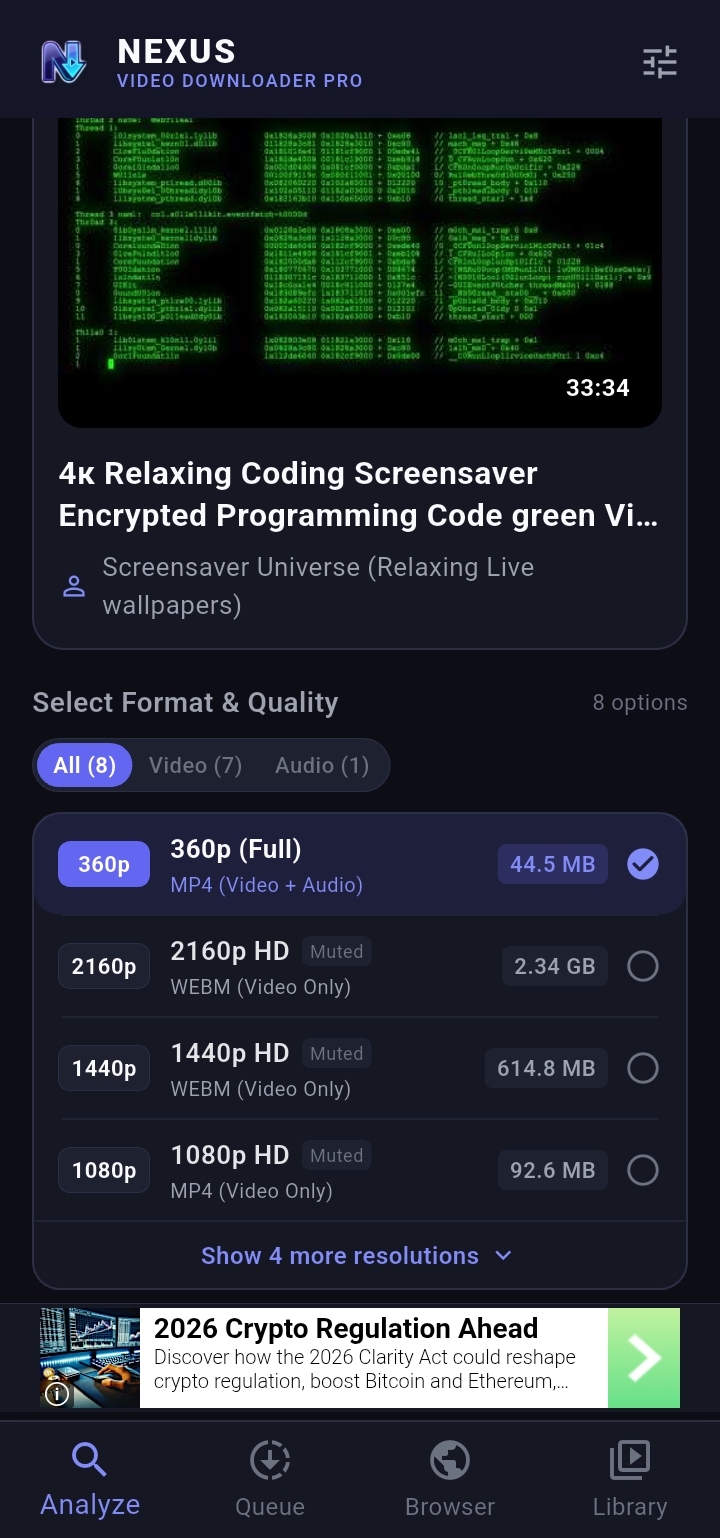
Instant Media Link Analysis
Paste any media link or let the app detect it from your clipboard. View available resolutions, accurate audio/video sizes, and subtitles before downloading.
Designed for Fast & Reliable Media Management
Loaded with state-of-the-art tools focused on speed, reliability, and complete local storage control.
Full Playlist Bundles
Download complete music playlists, tutorials, or video series with a single tap. Group downloaded tracks under a unified playlist card in your library.
Built-in Player & Subtitles
Enjoy offline video and audio playback immediately without third-party players. Features playback speed control, background playback, and subtitle rendering.
In-App Browser with Media Sniffer
Browse video platforms directly. The integrated sniffer ignores ads, filters looping previews, and lets you download streams with a single tap.
Public Storage & Auto-Sync
Files are saved straight to /Download/NexusDownloader. If you ever reinstall or clear cache, the built-in storage scanner recovers your media files.
Privacy-Focused Operation
All video stream parsing is processed on your device. We do not track searched URLs or collect your downloaded media history on remote servers.
Granular Bandwidth Controls
Set concurrent download slots (1 to 5), restrict downloads to Wi-Fi only to conserve mobile data, and manage background downloads effortlessly.
Supported Video & Audio Platforms
Extract videos, shorts, reels, playlists, and audio tracks from thousands of web destinations.
YouTube & YouTube Shorts
4K 60FPS, 1080p Full HD, full playlists, chapter markers, and automatic English subtitles.
TikTok & Douyin
Download HD TikTok videos with no watermarks and original background audio.
Instagram Reels & Stories
Save high-resolution Reels, Video Posts, and IGTV clips directly into your phone storage.
Facebook & Vimeo
Extract public Facebook Watch and Vimeo showcase videos in crystal clear HD.
Why Choose Nexus Video Downloader Pro?
See how Nexus outperforms standard online converter websites and conventional downloader apps.
| Feature / Capability | Nexus Downloader Pro | Web Online Downloaders | Generic Downloader Apps |
|---|---|---|---|
| 4K Ultra HD & 60FPS Support | ✓ Up to 4K 60FPS | ✗ Usually capped at 720p | ✗ 1080p requires paywall |
| Complete Playlist Batch Downloads | ✓ One-Tap Playlist Batching | ✗ Single URLs only | ✗ Paid add-on feature |
| No Watermark (TikTok / Reels) | ✓ 100% Clean HD MP4 | ✓ Sometimes | ✗ Adds their own branding |
| Built-in Offline Player with Subtitles | ✓ Full In-App Player (.srt) | ✗ No player included | ✗ Basic system intent only |
| Multi-Threaded Turbo Speeds | ✓ Up to 5 Concurrent Streams | ✗ Server throttled (slow) | ✗ 1 download at a time |
| Public Storage Accessibility | ✓ /Download/NexusDownloader | ✓ Saved to Downloads | ✗ Locked in app sandbox |
How to Download in 3 Steps
No complicated setups or technical knowledge required.
Paste or Browse
Copy any video URL to your clipboard or use the built-in browser to find media content directly.
Choose Quality
Select your preferred resolution (4K, 1080p, 720p) or pure audio, check file sizes, and enable subtitles.
Play Offline
Your download is saved directly to your device storage and added to your Library for offline playback.
Frequently Asked Questions
Everything you need to know about Nexus Video Downloader for Android.
/Download/NexusDownloader, making them accessible in your gallery, file manager, or any media player.
Legal & Privacy Disclosures
Clear terms regarding copyright, fair use, and data handling.
/Download/NexusDownloader.
Get Nexus Video Downloader for Android
Direct APK installation package for smartphones and tablets running Android 7.0 or higher.